
Music theory, right on your fretboard.
Understand theory on the fretboard, then practise: generative backing, ear training, metronome, groovebox… FretFace connects what you see, what you hear and what you play, to learn, practise or teach.
One tool, from the scale to the song.
Look at a scale, listen to a chord, play over it. It all happens in one place, with the same colours.
Find your bearings.
See scales and intervals on the fretboard. Connect notes with their positions.
Explore scales ↗ 02 / HEARHear the relationships.
Explore chords and progressions. Hear how a chord sequence gives your music its colour.
Discover progressions ↗ PractisePractise for real.
Practise with generative backing, train your ear, work on your timing with the metronome and the groovebox.
Discover the practice tools ↗Here is what it looks like.
Screenshots of the web app. Note colours are the same everywhere.
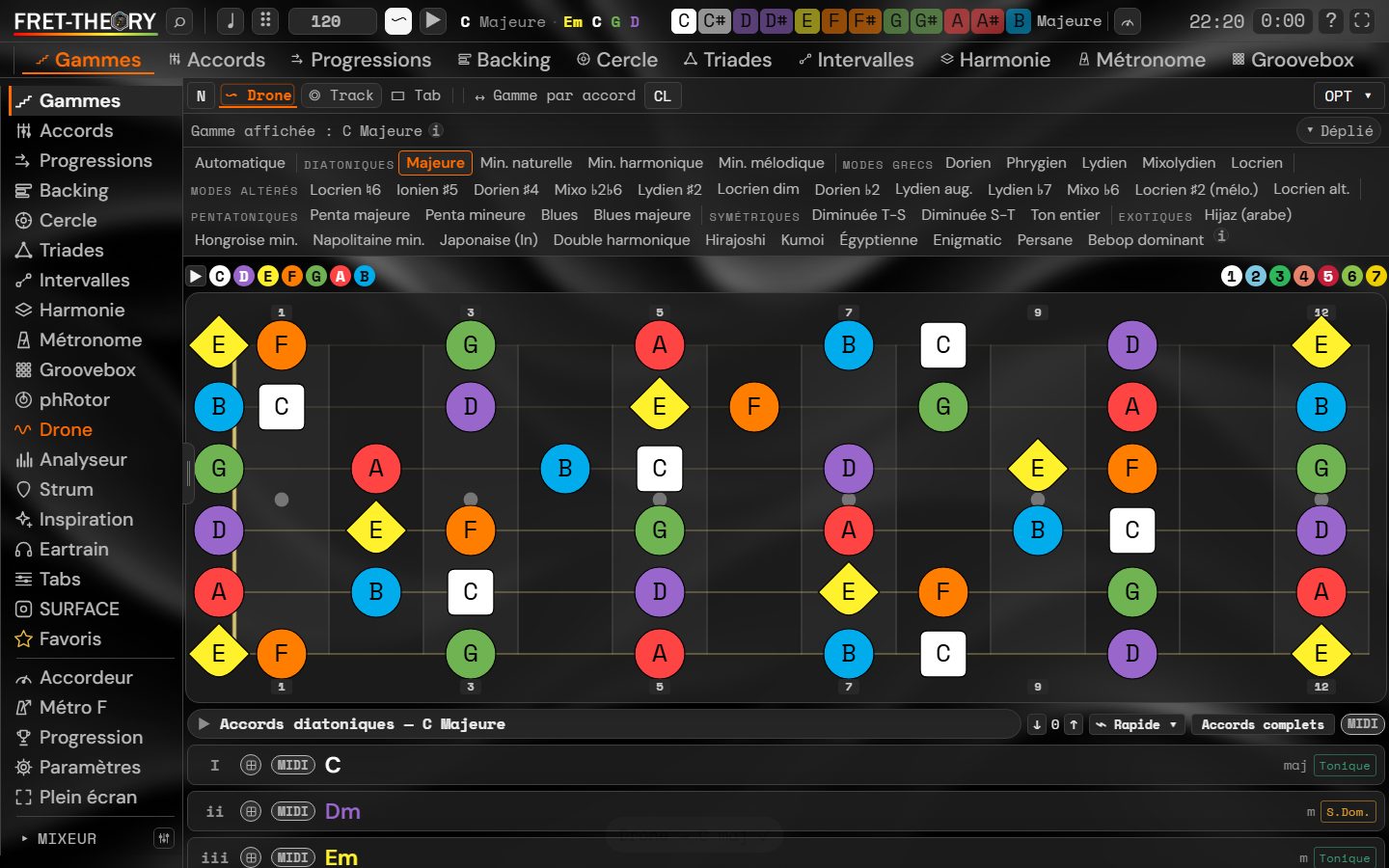
Scales: scales and modes on the fretboard. Each note has its colour; the root is a square, the third a diamond.
Each module: what it does and what it is for.
Click a module to see what it can do. Free, Explorer or Complete: the plan that includes it is shown.
Understand
ScalesSee any scale on the fretboard.Free
To understand where the notes of a solo or riff come from, and stop memorising positions.
- More than twenty scales and modes: major, natural, harmonic and melodic minor, Greek modes, altered modes, pentatonics and blues
- Notes, intervals or degrees on the fretboard; one colour per note, the root as a square, the third as a diamond
- Free tuning and string count, for guitar, bass or other string instruments
- “Scale for chord”: shows the scale that fits the chosen chord
- Drone, backing and tablature view reachable from the module
ChordsA living chord dictionary.Free
To find a shape, understand how it is built and know which scales it sits on.
- More than twenty types: major, minor, power chord, sus2, sus4, add9, sixth, min6, sevenths, ninths, eleventh, diminished, half-diminished, augmented
- Shapes on the fretboard (open or movable) with the interval stack
- Colours by note or by interval; listen to each chord
- List of scales compatible with the chord; add it to a progression in one gesture
TriadsThe three notes of the chord, everywhere on the neck.Explorer
To play and see chords on small string sets, in every inversion.
- Major, minor, diminished, augmented
- Root position and inversions, on groups of three strings
- Role of each note (root, third, fifth) shown by shape and colour
- Choice of the bass string
IntervalsMeasure the distance between two notes.Explorer
To learn to recognise and place intervals without counting frets.
- The twelve intervals, from unison to major seventh, with their name and semitone count
- Move the root to see the same interval everywhere
- Quiz mode to practise
Circle of fifthsThe map of keys.Free
To understand neighbouring keys, key signatures and the chords of each key.
- Key, number of sharps or flats, relative minor or major
- Diatonic chords with numerals (I, ii, iii, IV, V, vi, vii°), dominant and subdominant
- Major and minor modes; click a note to hear it, with octave choice
HarmonyBuild chords, notes and melodies.Explorer
To assemble a progression, see how chords relate and look for a melody on top.
- Three input modes: chords, notes, melody
- Root and more than fifteen chord qualities (sus, add9, sixth, sevenths, ninths, diminished, augmented…)
- Progression built step by step, with templates such as I–V–vi–IV or the blues
ProgressionsChord sequences to hear and play.Free
To find a sequence that works, understand each chord’s function and play along.
- Progression catalogue and chord bank
- Diatonic mode (chords of the scale) or free; borrowed chords (bVI, bVII, iv…)
- Listening and backing; MIDI input possible
Practise
Ear trainingTrain your ear, six exercises.Explorer
To recognise by ear what you see on the fretboard.
- Rhythm: rhythmic dictation to rebuild, three difficulty levels, score
- Intervals, chords, scale degrees, cadences and scales
- Listen, answer, check, new exercise in one click
RhythmRight-hand rhythms to play and create.Explorer
To work on the strumming or picking hand: patterns, accents, swing.
- Rhythm generator (for example D-DU-UDU) with adjustable time signature, subdivisions and swing
- Editor: down, up, muted, rest, on each subdivision
- Pattern library sorted by genre (pop, folk, rock, punk…) and by level
- Sound from samples or synthesis
MetronomeA precise, full-featured metronome.Free
To work on pulse, from the first slow tempo to advanced training.
- Tempo, tap tempo, accents adjustable beat by beat
- Swing and human feel, tempo ramp, random beat mute to test your steadiness
- Session timer, savable presets, visual flash and vibration, full screen
DroneA held note to set your ear.Free
To work on intonation, the colour of a mode, or to sing over a tonic.
- Note and octave of your choice, frequency shown
- Timbres: sine, sawtooth, square, triangle, bell
- Held chords: major, minor, sevenths, sus, add9, diminished, augmented
AnalyzerTell what you are playing.Explorer
To identify a chord, notes or a rhythm from what you place or play.
- Harmonic: place notes on the fretboard (frets, open string, muted string) to get the chord, notes and intervals
- Audio listening and MIDI input
- Rhythmic: tap tempo and analysis of the rhythm you play
TablatureRead, write and play tabs.Explorer
To note an idea, learn a piece or prepare course material.
- Editing, playback and library, free tuning
- Techniques: hammer-on, palm mute, let ring, bend…
- Copy, paste, add beats and bars; playback with adjustable tempo and speed
- Examples included; video export of tabs
SparkA starting point when you are stuck.Explorer
To start an idea without a blank page.
- Pick a genre: blues, pop, rock, jazz, folk, country, R&B, metal, reggae, bossa, latin, classical, funk
- Add a mood: bright, tender, melancholic, restless, triumphant, suspended, dark, airy
- Or let the app surprise you
Backing and composing
Backing (Structures)A band that plays your chords.Explorer
To play over a backing built from your chord grid, without recording tracks.
- Sections (verse, chorus…), bars and chords per bar, structure loops
- Rhythm per track: nylon, steel, baritone, clean/crunch/overdriven/jazz electric guitar, ukulele, piano, sitar, harp, dulcimer
- Styles and rhythms of your choice, backing generated from the grid
GrooveboxA step drum machine.Explorer
To build drum and percussion patterns and practise over them.
- Step grid per instrument: kick, snare, hi-hat, percussion, cymbal
- Pattern bank from A to H and song mode to chain them
- Drum kits and starting genres, automatic generation and pattern learning
- Send the result to the backing
SequencerA piano-roll to compose.Complete
To write melodies and lines, play them back and rearrange them.
- Piano-roll with entry by mouse, computer keyboard or MIDI
- Scenes A to H that can be chained, tracks with effects and sounds of your choice
- Idea generation, notebook, transfer to the other modules
Play
SurfaceAn expressive touch instrument and an expressive, versatile MIDI controller.Complete
To play the screen like an instrument, or drive your synths and DAW with a controller built to your needs.
- Pages made of freely arranged zones: grid of pads by scale degree, piano, drum pads, looper, arpeggiator
- Orbital wheels: seven scale-based layouts (tour, safe notes, pentatonic, modes, lock, duo, T-S-D functions), chained chords, continuous glissando
- Modeled strings: guitars, bass, ukulele, harp, violin, cello, erhu — pluck, bow, slide
- Expression: finger pressure, position and movement shape the sound; gesture vibrato
- MIDI controller: MIDI output (including MPE), keyboard routing per zone, key ranges, MIDI in and out on computer and Android
- Per-zone effects (chorus, delay, reverb…), ready-made page templates for solo, two-player or looping
Split between plans is provisional. The groovebox Step and Rotor modules will be presented later.
Playing in four minutes.
No manual to read: the app is learned by playing. Here is the shortest path, from a free account to your first progression.
An email address is enough.
Create your account with email and password (a confirmation email is sent) or sign in with Google. Your account keeps your settings, favourites and licences across devices.
Key, scale, fretboard.
In Scales, pick a root and a scale: each note has its colour, the root is a square, the third a diamond. Change tuning or string count in one gesture.
Drop a chord, follow a progression.
Open Chords or Progressions: the chord notes light up inside the scale. Start the backing to play over it.
Ear, pulse, touch play.
Train your ear, lock onto the metronome or groovebox, then, with Complete, play on Surface, an expressive touch instrument and a versatile, expressive MIDI controller: grid, Orbital wheels, modeled strings.
One tool, four ways to use it.
Guitarists
See scales, arpeggios and chords on your fretboard, 6 strings or more, free tunings. Get out of memorised positions.
Musicians and composers
Surface (expressive touch instrument and MIDI controller), harmony wheels, sequencer, groovebox: look for progressions, play chained chords, build a loop.
Teachers
Show theory on a real fretboard, share exercises, give your students 25% off and sign your teaching exports.
Schools and conservatoires
One licence for a whole class, volume pricing, simple student management and collective follow-up that respects privacy.
Useful tools, no sign-up.
Open the one you need straight in your browser.
Guitar scale viewer
Every key, scale and mode on the fretboard, with coloured notes and intervals.
Open the tool ↗Interactive chord dictionary
Chord shapes and interval stacking; listen to each chord.
Open the tool ↗Interactive circle of fifths
Neighbouring keys and the chords of each key, at a glance.
Open the tool ↗Online metronome
A precise metronome with adjustable tempo to work on your pulse.
Open the tool ↗Chord progressions
Try classic chord sequences and listen to them.
Open the tool ↗Reference drone
A drone on the tonic to work on intonation and modes.
Open the tool ↗See what you really practise.
In your user area, “My usage” shows time spent per module and the scales, chords and progressions you use the most. A simple compass to steer your practice.
Light and discreet
Tracking is just a small counter sent from time to time: it slows down neither the display nor the sound.
You stay in control
Turn tracking off, export your data or delete your account in one click under Settings.
Never the content of your creations
Only durations per module, scale or chord. On the team side, only aggregated, anonymous statistics.
Pick a scale.
Each note keeps its colour; the root and the third stand out by their shape.
Place a chord.
Its notes light up within the scale: you see where it comes from.
Practise.
Play over generated backing, train your ear, lock in with the metronome or the groovebox.
On computer, tablet or phone.
The web app is available now. Windows and Android installers come next; macOS, iOS and iPadOS may follow.
On iPhone and iPad, use the web app.
Control FretFace from your phone.
Turn on the remote in the app settings on your main device, then enter its session code on your phone.
Teachers:
let your students benefit.
The partner programme is free, on request and after validation of your teaching activity. No licence to buy to get your code.
−25% for your students.
Personal code valid on a first annual or one-time purchase of Explorer or Complete. Not combinable with promotions, and not usable on your own account.
Complete annual: €29.93 · One-time: €89.25Your name, our logo.
Validated teacher with a paid licence: add your name next to the FretFace logo on your teaching exports, at no extra cost.
Complete for teachers: €119, same as CompleteTell us about your activity.
Share your website, your lesson ad or proof of teaching. Each student keeps their own account and licence.
Request my code →Sheets, homework, sharing.
PDF course sheets with your logo, homework as exercise links, sharing an app state through a simple URL, presentation mode for video calls or the board.
In preparationProgramme planned for the commercial release; personal codes and exports are not active yet.
One licence for the whole class.
Music schools, conservatoires, secondary schools with music options, associations: an offer designed for group teaching.
Volume pricing.
From 10 students: up to 60% off yearly Complete depending on seats. Teacher seats included. Invoice and bank-transfer payment.
60-day trial on request25% off for personal use.
Students of the institution get a discount on their own licence to practise at home. Each student keeps a personal account.
Institution codeClasses, seats, usage.
Class-code invitations, collective usage follow-up (with the consent of students, and of guardians for minors), white label available for institutions that want it.
Request a quote →Institution offer in preparation: indicative prices, on quote, no billing open yet.
Choose how you play.
Theory, practice, touch play or all of FretFace. One licence for web and apps.
Free
A first contact with FretFace.
Explore the app ↗- Essential scales and chords
- A few progressions to get started
- Metronome and touch-play preview
- Browser access
Explorer
Permanent licence for the major version purchased.
- Scales, chords, triads and intervals
- Harmony and circle of fifths
- Progressions and backing
- Practice tools: rhythm, ear training, metronome
- Standard groovebox included
- No Surface, sequencer or Rotor mode
Complete
Permanent licence for the major version purchased.
- All Explorer tools
- Surface: expressive touch instrument and versatile MIDI controller
- Sequencer and groovebox Rotor mode
- MIDI controllers
- Surface pack with sequencer included
Surface pack with sequencer
Surface + sequencer + Rotor mode + MIDI controllers. The standard groovebox is included in Explorer.
Explorer + pack separately: €128. Complete: €119. Already own Explorer? Upgrade to Complete for €40.
Terms and details
Prices are proposed in euros including VAT and may change. A one-time purchase includes the major version purchased, with its updates and fixes; future major versions and new Academy courses may be sold separately. A subscription includes new versions of the plan’s tools while it is valid. Feature split is provisional. Online purchase is not open yet: no payment is possible for now.
Development log
What changed recently, without the sparkle.
- Accounts, plans and your usageAccount creation, Google sign-in, plans and a user area. Still a prototype: payments are simulated.
- A lighter reverbOn the test tablet the sound crackled when playing fast. The reverb was too greedy: it is rewritten, and the audio processor drops from about 100% to 20% while playing.
- Orbital: seven scale-based layoutsTour, safe notes, pentatonic, modes, lock, duo, T-S-D functions: the wheel adapts to the chosen scale.
- Surface pages reorganisedPage templates grouped by use, pages can be reordered with a long press.
- Harmony wheel and modeled stringsFirst version of the Orbital zone; violin, cello and erhu modeled.
What is FretFace?
A theory and practice app for guitarists, musicians and teachers: scales, chords and progressions on the fretboard, generative backing, ear training, metronome and groovebox. The name is provisional and may change; the app stays available at its current address.
Do I need to know music theory already?
No. You can start by exploring the fretboard and listening to chords, then go deeper into theory, or jump straight to practice with backing and ear training.
Do I need to install the app?
No. The web app works directly in your browser. Windows, macOS and Android versions are coming; leave your email to be notified.
Subscription or one-time purchase: what is the difference?
A subscription gives access to the plan while it is valid, new versions included. A one-time purchase is a licence for the major version bought, with updates and fixes; future major versions and new Academy courses may be sold separately.
Can I buy a plan right now?
Not yet: prices are shown for information, no payment details are requested and no payment is made.
Does it work on tablet and phone?
Yes, the web app works on mobile and tablet. Comfort and some audio or MIDI features may vary depending on browser and device.
How do I create an account and sign in?
With an email address and password (a confirmation email is sent), or with your Google account. Purchases are attached to your account: sign in with the same address in the app and on the site.
What happens to my data and statistics?
Your settings and favourites are stored on your account. Usage tracking only counts durations per module, scale or chord; you can turn it off, download your data or delete your account from your user area.
Can I get a refund?
Digital content is available immediately: by purchasing, you request that access and waive the 14-day withdrawal right. Detailed conditions will be set out in the terms before sales open.
Do my licences work on all my devices?
Yes: the licence is tied to your account, not to a device. Sign in on computer, tablet or phone. Once loaded, the web app stays usable offline.
Do you offer prices for schools?
Yes, on quote: volume pricing from 10 students, teacher seats included, a discount for students’ personal use. Write to us with the size of your institution.
Is the name FretFace final?
No, it is a working name: the product is at prototype stage. Your accounts and licences will follow if the name changes.
Give it a try, it’s free.
Grab your guitar, open the app, pick a scale.